
Live WordPress Demo
Open for Agents running on a real WordPress site
Prepare a detailed form, shop with approval, build a character, or create an absurd sandwich. Each demo runs on the same live site.
Storefront, Buddy, and Kitchen include an Assistant that works in an ordinary modern browser without an extension or API key. Form Preparation instead uses a compatible WebMCP browser assistant and leaves the final Send button with the visitor. WebMCP remains experimental, and browser support is not universal.
Ready to use the Core plugin on your site? Install Open for Agents 0.3.55 from WordPress.org.
Choose a live demo
Start with the task that interests you. The form and Storefront solve practical jobs; Buddy and Kitchen show how the same approach works for more playful experiences.
Prepare a catering quote for our 48-person product launch. Shared-table service, mixed dietary options, setup from 3 pm.
11 answers ready to reviewNothing submitted
Live form preparation
Skip the repetitive form-filling
Give your browser assistant the details once. It prepares a real WPForms quote request on the page, while you keep the final say.
- Turns one event brief into 11 visible form answers
- Uses the form’s exact fields, choices, and validation
- Leaves correction and submission with the visitor
Requires a compatible WebMCP browser assistant. The ordinary form remains available to everyone.
Try the live form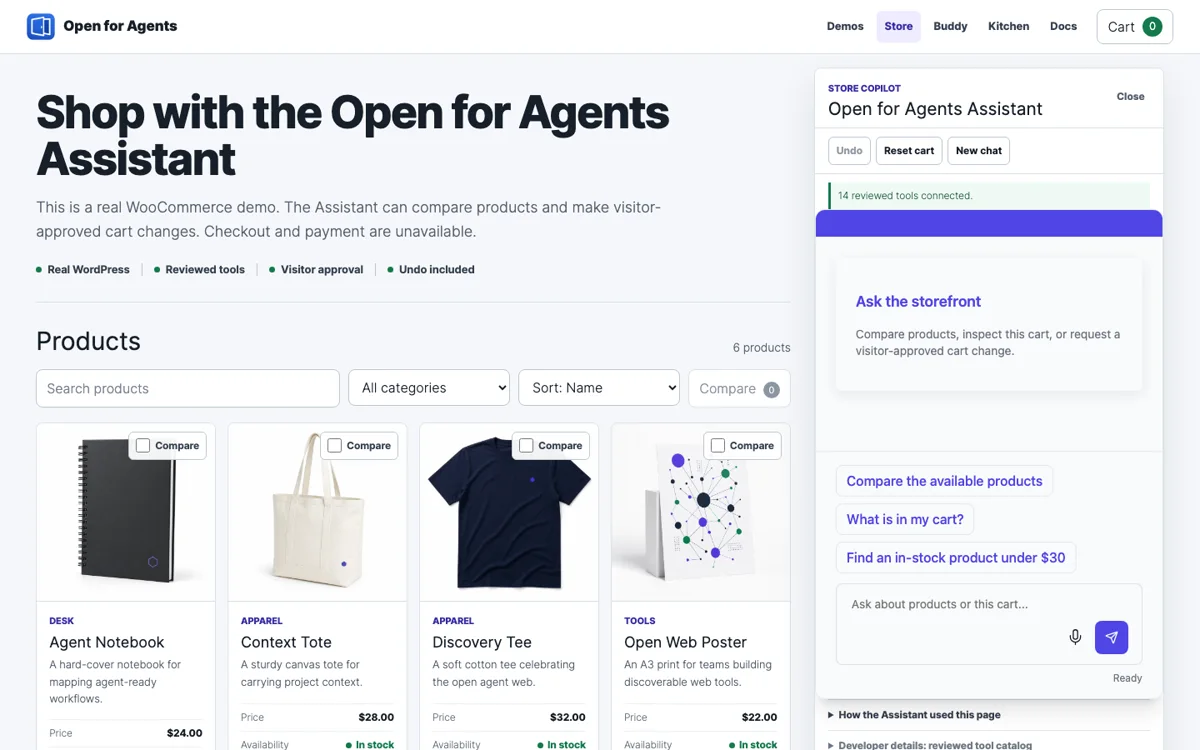
Storefront Assistant
Ask, compare, approve, and undo
Use an embedded AI Assistant on a real WooCommerce store. Ask it to find products, compare choices, inspect the cart, or request a cart change through the WordPress tools on the page.
- Searches and compares a real WooCommerce catalog
- Requires visitor approval before cart changes
- Includes Undo, Redo, Reset cart, and visible tool activity
Works in an ordinary modern browser. No extension or API key required.
Try the live Storefront AssistantPrompt: "make him a golden space wizard"
Build-a-Buddy
Ask the embedded Assistant to turn one sentence into a customized buddy by chaining safe page tools on a live WordPress site.
Try it in an ordinary browser, then inspect the same page with a compatible WebMCP client.
Open Build-a-BuddyPrompt: "most cursed sandwich imaginable"
Cursed Kitchen
Ask the embedded Assistant to build an absurd sandwich from one prompt, with layered state, shareable output, and richer page controls.
A deeper stateful flow using constrained actions on the active WordPress page.
Open Cursed KitchenWhat powers the Assistant demos?
In Storefront, Buddy, and Kitchen, Core chooses the tools, the separately installed Assistant provides the conversation, and the hosted service connects it to the model. Form Preparation uses Core directly through the compatible browser agent instead.
Real WordPress and WooCommerce state
The Assistant reads the live demo’s current products, comparisons, and cart state. It is not answering from a static storefront script.
Tools chosen in Core
The Core plugin decides which site tools are approved, public, and available to the Assistant.
Separately installed Assistant interface
The Open for Agents Assistant add-on provides the on-site conversation interface; it is not bundled in Core.
Model connection on the hosted service
The hosted service connects the Assistant to the model and approved tools. Model credentials stay on the server.
Approval before cart changes
A cart mutation pauses as a visible proposal. The visitor sees the exact action and approves before WordPress applies it.
Human-only checkout and payment
The demo stops at the approved cart boundary. Checkout, payment, order placement, authentication, and accounts stay with the visitor.
Understand the complete Assistant experience or read the technical Assistant documentation.
What you can try on the demo
Real WordPress site
The demo is a hosted WordPress site, not a static mockup. Its public pages expose the same discovery signals agents would find on a normal site.
Page-specific actions
The playful demos use a small set of actions for the current page rather than unrestricted site-wide automation.
Useful to visitors and agents
Visitors can use the demos directly, while published tools give compatible agents a clearer way to understand the page.
Published site information
Inspect what the site publishes
These machine-readable pages show the public information behind the demo.
Readiness report
Review the public discovery report and the files and endpoints it declares.
Open readiness JSONAction catalog
Inspect the published capability catalog generated by the WordPress plugin.
Open action catalogNew to the product? See how Open for Agents works or read the Getting Started guide.